Your Cart
Your shopping cart is empty.
$9
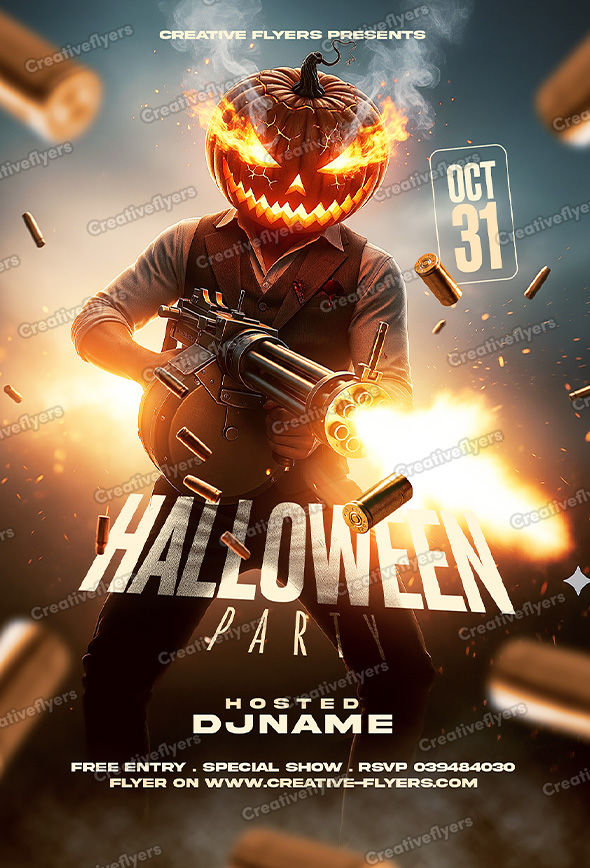
Flaming pumpkin gangster fires bullets in a bold Halloween scene. Cinematic pumpkin shooter ignites a thrilling Halloween vibe. Editable graphic design with Adobe Photoshop (basic Photoshop skills required).
This Halloween flyer ignites the night with a flaming pumpkin-headed figure wielding a massive gun, surrounded by flying bullets and fiery smoke. The dramatic lighting, sharp typography, and cinematic action vibe make it perfect for clubs or parties seeking a bold, adrenaline-fueled design that screams excitement and danger.
All the elements are modifiable and customizable, the texts can be modified with the Photoshop text tool. A help file included, you will get font download links. You will of course need some basic Photoshop knowledge, if you have any additional questions let me know if there is anything else I can help you with. Enjoy !
– PSD format (compatible with Adobe Photoshop)
– Flyer Dimensions: 6×8.4 in (15x21cm) + 0.25 bleed
– Web and print to print, Rgb, 300 DPI.
– Model and all elements are included.
– All texts are editable with the Photoshop text tool.
– Free fonts used (font download links in folder)
Customize text, adjust colors, and replace images in just a few clicks to create professional designs that match your brand and vision.
Edit your design effortlessly with compatible PSD editing software. Personalize text, colors, images, and other editable elements to suit your needs.
All included files and resources are clearly listed so you know exactly what you're getting.
Use your template with confidence. License details specify permitted uses and any applicable restrictions.
Please take a moment to review the FAQ below for answers to common questions. If you need further information or have any additional questions, feel free to contact us. Our dedicated support team is available 7 days a week to assist you.
Customizing your new flyer template is quick and easy, follow these simple steps to create your own design!
1. Open Your File
Launch your preferred editing software and open the downloaded .psd file.
2. Navigate the Layers Panel
Look at the Layers panel on the right side of your screen.