Description
Dazzling Gold Ornament PSD Xmas Party Flyer
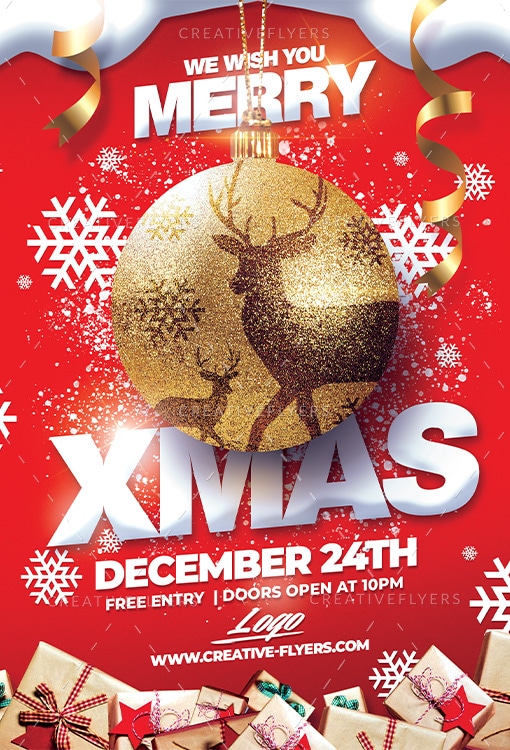
A high-impact, festive flyer dominated by a bright red background and sparkling snow effects. The central feature is a massive, glittery gold Christmas ornament displaying a dark silhouette of a stag and fawn. Bold white text below announces “XMAS DECEMBER 24TH.” The design includes white snowflakes, falling snow, and golden ribbons curling from the top. The bottom features a pile of holiday gift-wrapped presents, emphasizing the festive season.
All written texts can be modified, help file included, you will get font download links. You can also use it as a postcard or e-flyer on your social networks.
Flyer Features:
- PSD Files Compatible With Adobe Photoshop
- Flyer Size A5 : 6×8.4 in + 0.25 bleeds
- Print Ready, 300 DPI, CMYK.
- All Elements included.
- All texts are editable with Photoshop text tool.
- Uses free fonts (font download link in documentation file)
FAQs
How can I customize this flyer template?
You can customize this flyer template using Adobe Photoshop. All text, colors, and images are fully editable through well-organized layers, making it easy to adapt the design to your needs.
What file formats are included?
This product includes a PSD file compatible with Adobe Photoshop.The exact formats may vary depending on the design, and you’ll find all details listed on the product page before purchase.
How to unzip the downloaded flyer?
After downloading, you’ll receive your flyer in a ZIP file. To unzip it:
- Windows: Right-click the ZIP file and select “Extract All…”
- Mac: Double-click the ZIP file to extract it automatically
- Mobile: Use an extraction app such as WinZip or iZip
Once unzipped, you can open the PSD file in Photoshop.
What if I need technical assistance?
If you ever need technical assistance whether it’s with downloading, opening, or customizing your template we’re here to help. Just contact our support team with your order details, and we’ll be happy to assist you quickly.